Species detection
In this section you will run the species_detection pipeline, which automatically detects and identifies species in the recordings using the BirdNET model, filters results for your target species list, and extracts audio segments containing relevant vocalizations. Additional models will be integrated in future versions of pamflow.
To run the pipeline:
pamflow run --pipeline species_detection
Detection outputs
The pipeline produces two summary figures, two observation files, the audio segments and the annotation files for expert review (described in the following sections).
The figures are stored in data/output/species_detection/:
observations_summary.pdf— a high-level summary showing total observations, number of species detected, and the proportion of recordings with detectionsobservations_per_species.pdf— a bar chart showing the number of detections per species
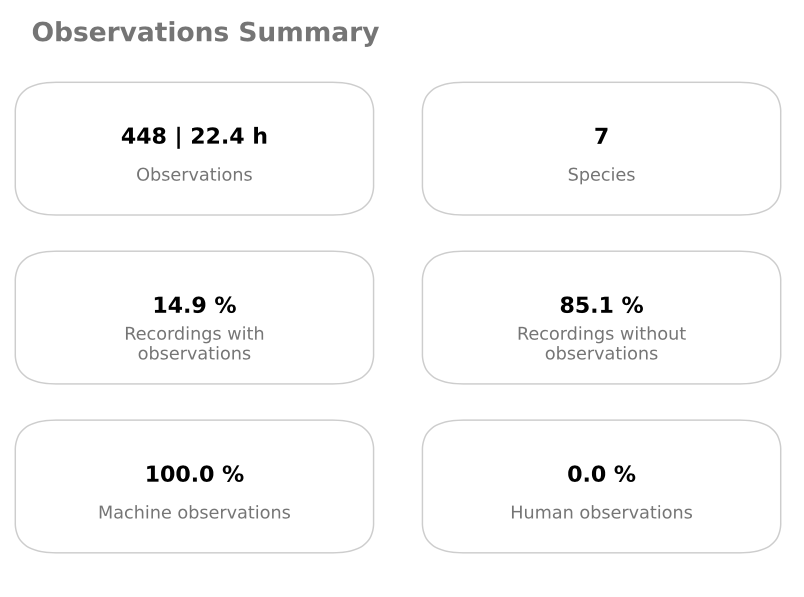
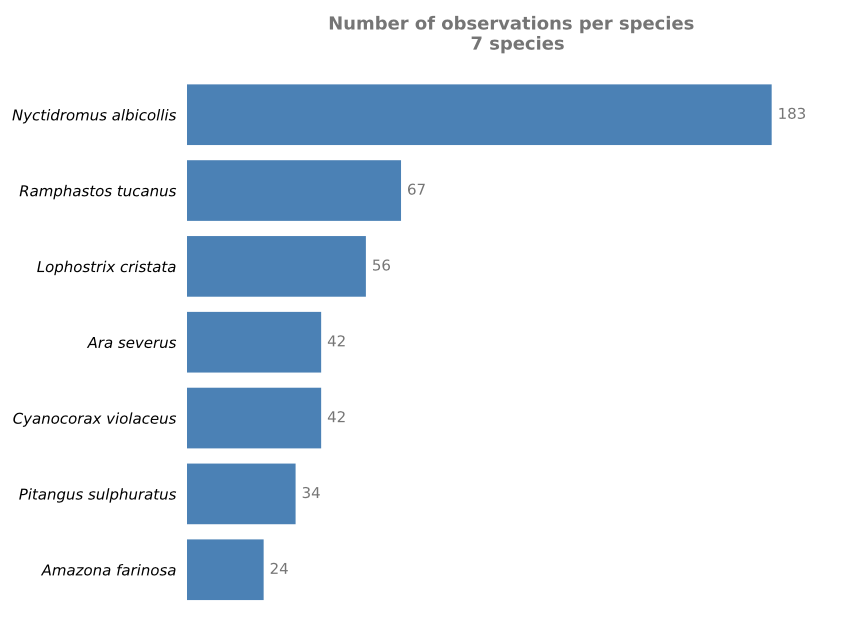
The output files are also stored in data/output/species_detection/:
unfiltered_observations.csv— all detections regardless of speciesobservations.csv— detections filtered to yourtarget_specieslist only (see Input data)
Each row represents one detection, with the audio file name, timestamp, species scientific name, and the model’s confidence score. You can learn more about the file format in the Data Exchange Formats section.
observationID |
deploymentID |
mediaID |
scientificName |
eventStart |
eventEnd |
classifiedBy |
classificationProbability |
… |
|---|---|---|---|---|---|---|---|---|
0 |
MC-002 |
MC-002_20240229_003000.WAV |
Lophostrix cristata |
12.0 |
15.0 |
Birdnet 2.4 |
0.191 |
… |
1 |
MC-002 |
MC-002_20240229_003000.WAV |
Lophostrix cristata |
42.0 |
45.0 |
Birdnet 2.4 |
0.112 |
… |
2 |
MC-002 |
MC-002_20240229_003000.WAV |
Lophostrix cristata |
51.0 |
54.0 |
Birdnet 2.4 |
0.118 |
… |
3 |
MC-002 |
MC-002_20240229_033000.WAV |
Ciccaba virgata |
21.0 |
24.0 |
Birdnet 2.4 |
0.144 |
… |
4 |
MC-002 |
MC-002_20240229_033000.WAV |
Ciccaba virgata |
30.0 |
33.0 |
Birdnet 2.4 |
0.103 |
… |
… |
… |
… |
… |
… |
… |
… |
… |
… |
Note
Detection confidence scores are low by default — pamflow keeps all detections above 0.1 (the default minimum confidence of the birdnetlib package, not configurable in pamflow), so results should always be reviewed carefully. For example, Lophostrix cristata detections in this dataset are suspicious given that the deployment site is a pasture, where this forest owl would be unexpected. The audio segments and annotation files in the following steps are designed precisely to help with this review. For further guidance on interpreting model outputs, see Wood and Kahl (2024).
Audio segments
To validate the detections, audio segments for each target species are saved in data/output/species_detection/segments/, with one subfolder per species. These clips can be shared with bird experts for manual review and confirmation. The selected segments are also listed in segments.csv. The number of segments per species (segment_size) and the length of each clip (segment_length, 3 seconds by default) are set in species_detection_parameters; defaults are in conf/base/parameters/species_detection.yml and can be overridden in conf/local/parameters.yml.
Each clip is named following this structure:
<classificationProbability>_<originalFileName>_<startTime>_<endTime>.WAV
This makes it easy to identify the source recording, the time of the vocalization, and the model’s confidence in its identification.
Data annotation
To make expert review straightforward, one Excel file per target species is generated in data/output/species_detection/manual_annotations/. Files are named after the species, e.g. Amazona_farinosa_manual_annotations.xlsx (see manual_annotations_file_name in Pipeline details). Each file lists the selected audio segments for that species. Once the audio clips have been reviewed, the expert only needs to fill in two columns:
positive— typetrueif the detection is correct,falseif not, or?if you are unsure. Other values such asyes/noare also accepted (seepositive_values,negative_valuesanduncertain_valuesin Pipeline details). Leave it empty for segments you have not reviewed yetdetectedSpecies— if the detection is incorrect, type the actual species name (if known)classifiedByandclassificationTimestamp— optional. Type your name and the review date to keep a record of who validated each segment
The completed annotation files feed back into pamflow in subsequent steps to refine and validate the final results.
For example, the annotation file for Amazona farinosa looks like this:
segmentsFilePath |
filePath |
classificationProbability |
eventStart |
eventEnd |
scientificName |
positive |
detectedSpecies |
|---|---|---|---|---|---|---|---|
0.841_MC-009_20240301_073000_36.0_39.0.WAV |
…/MC-009/MC-009_20240301_073000.WAV |
0.841 |
36 |
39 |
Amazona farinosa |
||
0.684_MC-009_20240301_073000_0.0_3.0.WAV |
…/MC-009/MC-009_20240301_073000.WAV |
0.684 |
0 |
3 |
Amazona farinosa |
||
0.659_MC-009_20240301_073000_33.0_36.0.WAV |
…/MC-009/MC-009_20240301_073000.WAV |
0.659 |
33 |
36 |
Amazona farinosa |
||
0.653_MC-009_20240301_073000_30.0_33.0.WAV |
…/MC-009/MC-009_20240301_073000.WAV |
0.653 |
30 |
33 |
Amazona farinosa |
Now that the annotation files are ready, let’s move on to the next step to validate the detections and get a recommended threshold per species.
Optional: Reviewing detections with the BirdNET GUI
Reviewing Detected Segments with the BirdNET GUI
The audio segments produced by pamflow can be reviewed directly using the BirdNET Analyzer GUI. This provides a convenient way to manually inspect detected segments, listen to the corresponding audio, and validate detections using BirdNET’s review interface.
Before You Start
Note
Before opening the segments in BirdNET, ensure that the audio files use the lowercase .wav extension. Depending on the operating system and workflow, pamflow may generate files with an uppercase .WAV extension, while the BirdNET GUI expects .wav files during review. Only the filename extension needs to be changed; no audio conversion is required.
For example:
segment_001.WAV
should be renamed to:
segment_001.wav
Opening Segments in BirdNET
Once the file extension has been changed, the directory containing the segments can be opened directly from the BirdNET GUI review interface.
Open the BirdNET GUI.
Navigate to the Review section.
Select the option to open or load audio files for review.
Navigate to the directory containing the segments generated by pamflow.
Select the
.wavsegments and load them into the interface.
Validating Detections
After loading the segments, BirdNET allows users to review detections individually. Users can:
Listen to the detected audio segments.
Review the corresponding BirdNET detections.
Manually validate or reject detections.
This workflow provides an efficient mechanism for expert validation while leveraging the detection and export capabilities of pamflow.
